
Skip to content

Features

How your team stops retyping.

At each step you see what Vink does. You only check what Vink isn't sure about.

200 free credits. No credit card.

/app/o/k7x2p9qm
From a handwritten work order to data in your system.

1It arrives

Everything arrives in one place.

Upload a stack or email them in. Vink picks the Form for each document by itself.

Documents come in by themselves.

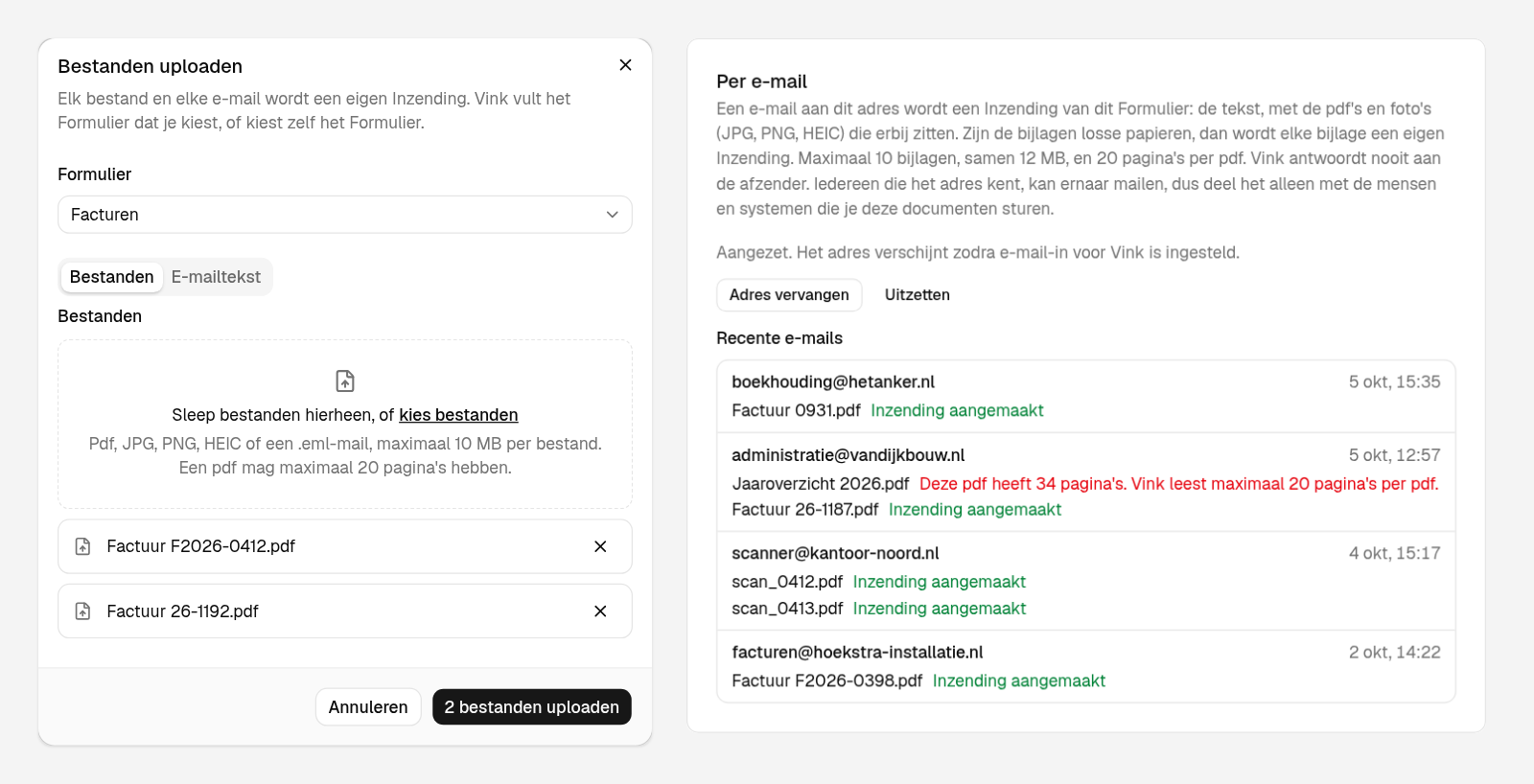
Drag in several PDFs, photos, emails, spreadsheets and Word files at once, or give a Form its own email address and let suppliers, scanners or other systems send their files straight in.

  • Several files in one go, each with its own progress and errors
  • One email address per Form, switched on by an Admin
  • Recent emails shows what came in, and what was refused and why
  • Files up to 10 MB, PDFs up to 20 pages

Other sources? Tell us.

/app/o/kantoor-noord/forms/invoices
The upload dialog with two PDFs ready to go, next to a Form's email settings and its recent emails. One attachment was refused for having more than 20 pages.

Any document can go to Vink.

Typed, scanned, faxed or filled in by hand; one page or a whole bundle. All pages of a Submission fill one set of values.

  • Handwriting, stamps and crossed-out numbers
  • Tables become lists: one entry per invoice line or order line
  • No template per layout: a new supplier's invoice just works

2Vink reads it

Vink does the typing.

You say once what you need. Vink finds it in every document, whatever the layout.

Pick an invoice:
  1. 1

    You make a Form.

    Pick the fields you need: text, number, date, or a list of lines. Or upload one sample document, and Vink proposes the fields.

    Invoices5 fields
    • Suppliersupplier
    • Invoice numberinvoice_number
    • Invoice dateinvoice_date
    • Total excl. VATtotal_excl_vat
    • LineslinesItemitemAmountamount
  2. 2

    Vink finds your fields on every invoice.

    Every supplier uses a different layout. Vink reads them all, scans included. You build no template per supplier.

  3. 3

    Your system gets the data.

    After approval, the data goes to your own system as JSON. Your field names are the keys.

    POSThttps://your-app.example/vink
    {
      "event": "submission.approved",
      …
      "data": {
        "supplier": "Drukkerij Hoekstra B.V.",
        "invoice_number": "F-2026-0418",
        "invoice_date": "2026-09-14",
        "total_excl_vat": 1240,
        "lines": [
          {
            "item": "Flyers A5, 5,000",
            "amount": 740
          },
          {
            "item": "Posters A2, 200",
            "amount": 500
          }
        ]
      }
    }

    Pick another invoice. The values change, the keys stay the same.

One Form per kind of document.

Make as many Forms as you need. Each Form has its own fields, its own email address and its own integrations.

  • Invoices
  • Damage claims
  • Work orders
  • Order forms
  • Inspection reports
  • Receipts

Your fields, not a template.

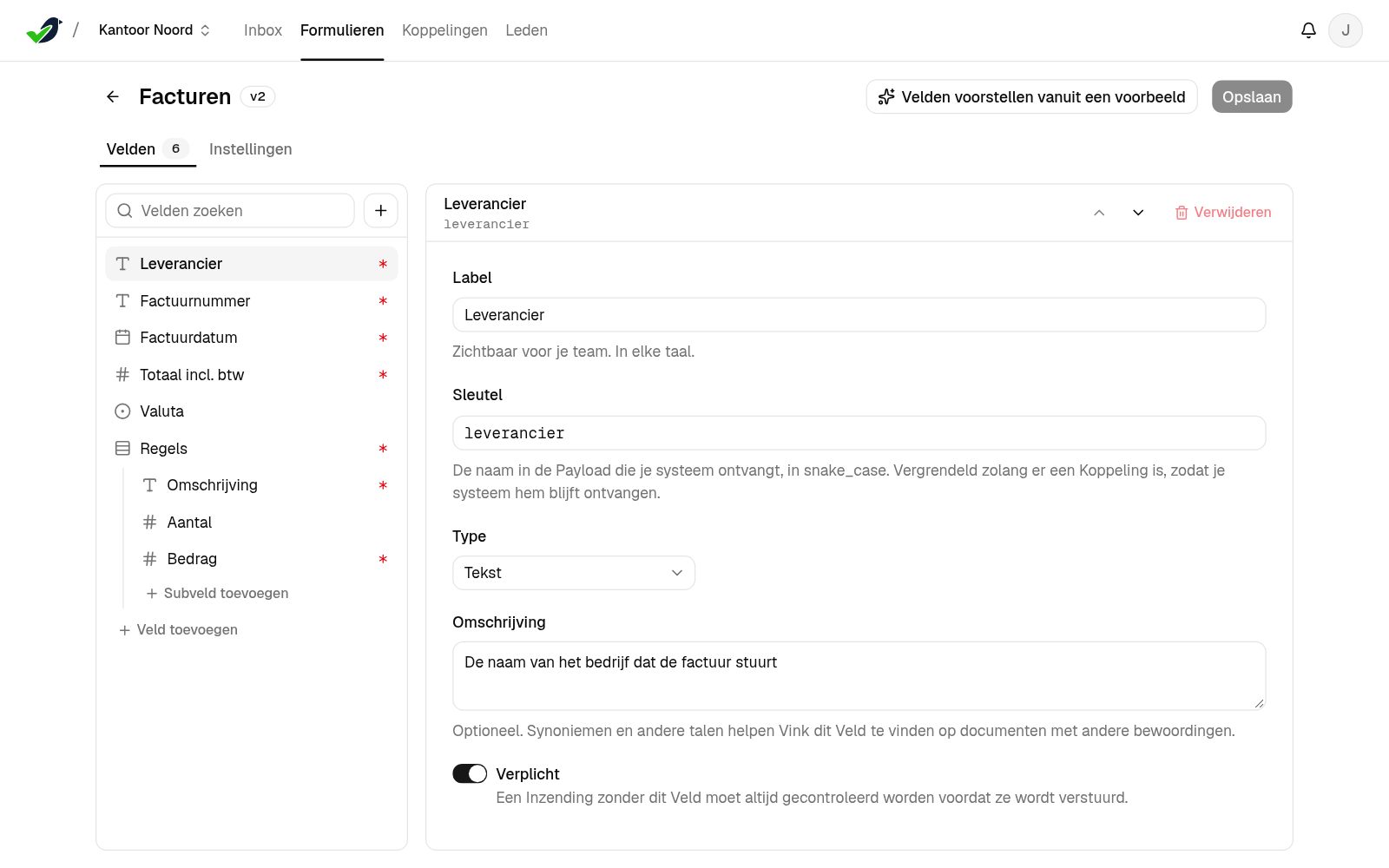
Describe the fields you need in plain words, or upload one sample and Vink proposes them. You edit them, then save.

  • Text, number, date, yes/no, choice and list fields
  • A short description per field guides the reading
  • Change a Form any time; each Submission keeps the version it came in with
/app/o/kantoor-noord/forms/invoices
The Form editor for Invoices with six fields, one of them a list, and the option to propose fields from a sample.

Every value, with its source.

Click a value and the PDF turns to the page it came from. A value to check also shows the text as it was read.

  • “Read on page N” next to every value to check
  • A confidence on every value, from 0 to 1
  • Conflicting readings are shown, not guessed away
/app/o/kantoor-noord/submissions/jd72q8vn

You check

You only check what's unsure.

Vink flags what it isn't sure about and shows the page each value is on. Nothing is sent until someone approves it.

Check only what's flagged.

Vink flags a value when it's unsure, when it doesn't fit the field, when a required value is missing, or when two readings disagree. Confirm it or type the right value.

  • A Review Threshold per Form, 0.80 by default
  • The reason next to every flag
  • Your corrections are never overwritten
/app/o/kantoor-noord/submissions/jd7f4mx1

Nothing is sent without approval.

Someone on your team approves each Submission before it's sent. For Forms you trust, switch on Auto-Send: a Submission then goes out by itself, but only when nothing in it needs review.

  • Approve, or reject a blank or wrong Submission with a reason
  • Auto-Send is set per Form, and off until you switch it on
  • Every Approval records who and when
/app/o/kantoor-noord

Try it · demo data

This morning's Inbox. Clear it.

Eight Submissions came in. One was already approved automatically and one fits no Form. Open the others, check what Vink flagged, and approve. This is the app itself, with demo data.

Click a value to turn to its page. Works on your phone too.

Vink/Kantoor Noord
Demo data

Inbox

Status updates arrive here as soon as they happen.

4,800 credits left

SubmissionUploaded

Complaints

30 Sept 2026, 08:28

Invoices

30 Sept 2026, 08:26

Work orders

30 Sept 2026, 08:24

Damage claims

30 Sept 2026, 08:21

Service requests

30 Sept 2026, 08:14

Orders

30 Sept 2026, 08:07

4It lands

The data is in your systems, with no extra work.

Approved data goes to your system as clean JSON, keyed by your own fields. Or you keep it in Vink.

Your system gets clean JSON.

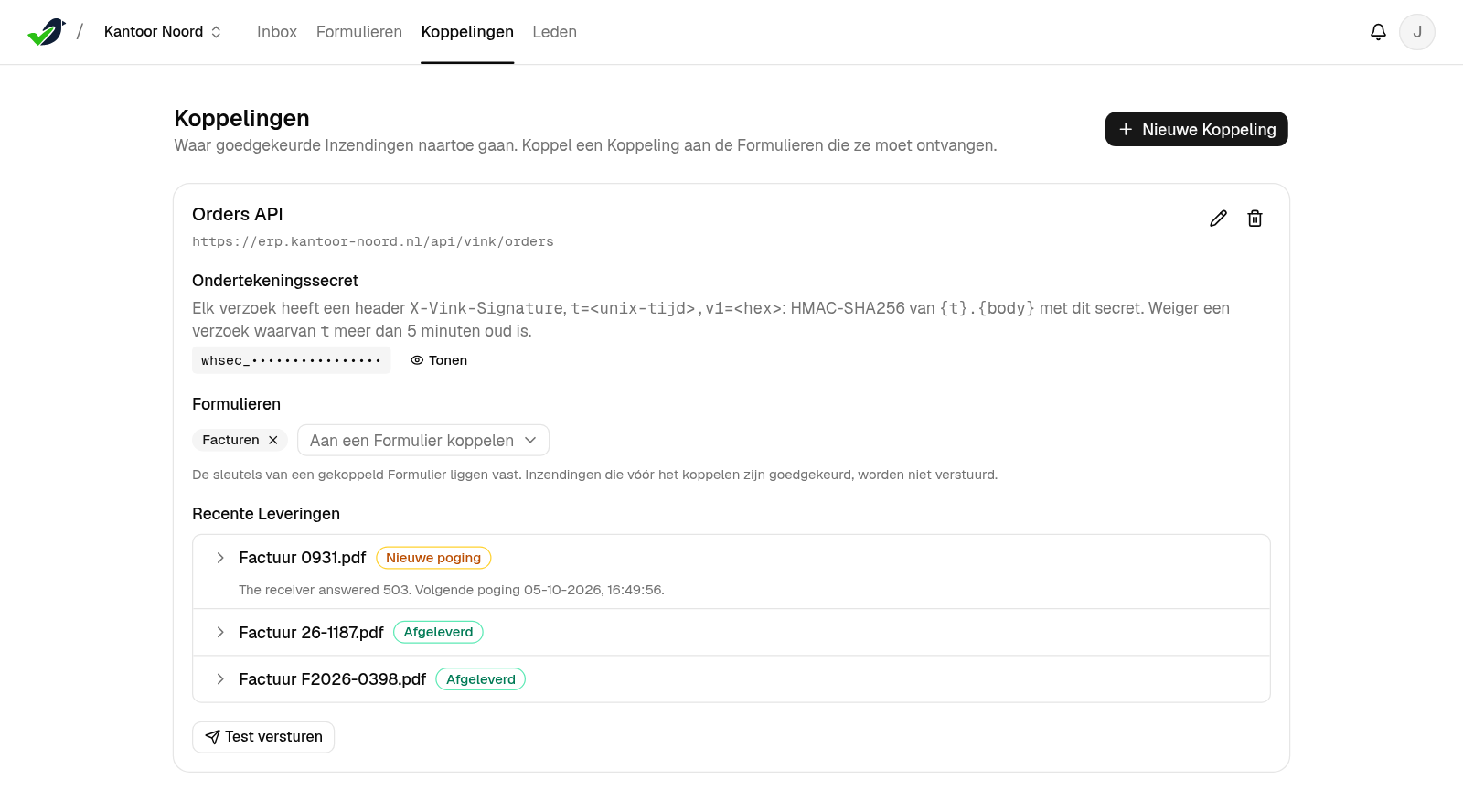
Approved data goes out keyed by your own fields. Your developer connects one webhook, or we build the connection for you.

  • Signed requests, automatic retries, send again by hand
  • Test-send before you go live
  • One Integration can serve several Forms

Read the developer docsAsk about a connection

/app/o/kantoor-noord/integrations
An Integration called Orders API with its recent Deliveries: delivered, delivered, retrying.

No system yet? Your data is in Vink.

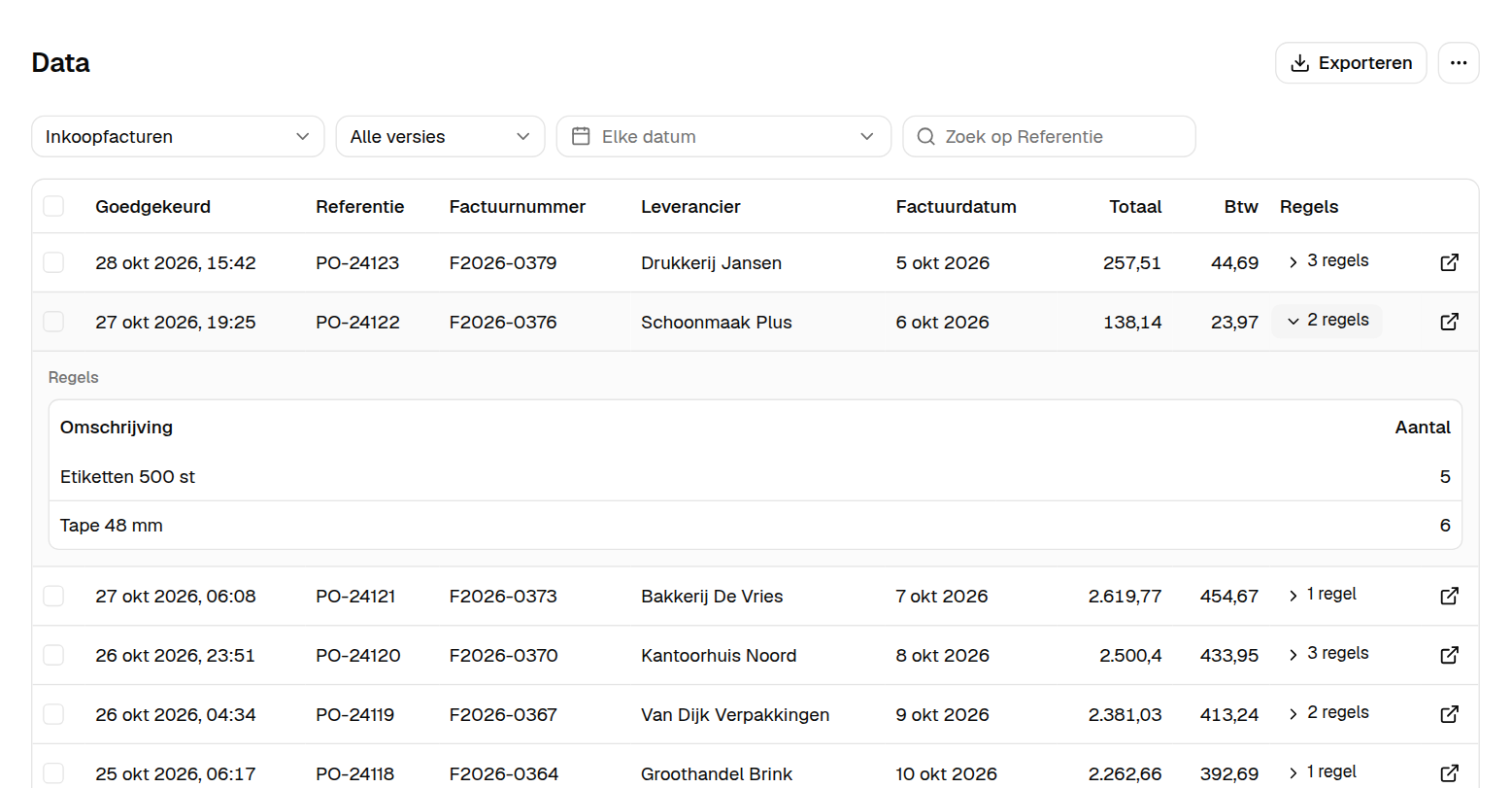
Turn on Keeping data. Every approved Submission then lands as a row in a table, per Form.

  • Filter by period, version and Reference
  • Export to Excel or CSV
  • Your agents and programs read the rows through MCP and the API

Let your agent build a dashboardRead the API reference

/app/o/kantoor-noord/data
The Data page with approved purchase invoices as rows: date, Reference, supplier and total.

+Around it

For the whole team.

Everyone who handles the documents, on every plan.

Your whole team. No seat count.

Invite colleagues as Admin, Editor or Member. Admins set up Forms and Integrations; Editors tune the Forms; Members upload, check and approve.

  • Unlimited users on every plan
  • Several Organisations under one login
  • Each Organisation's data is kept apart
/app/o/kantoor-noord/members
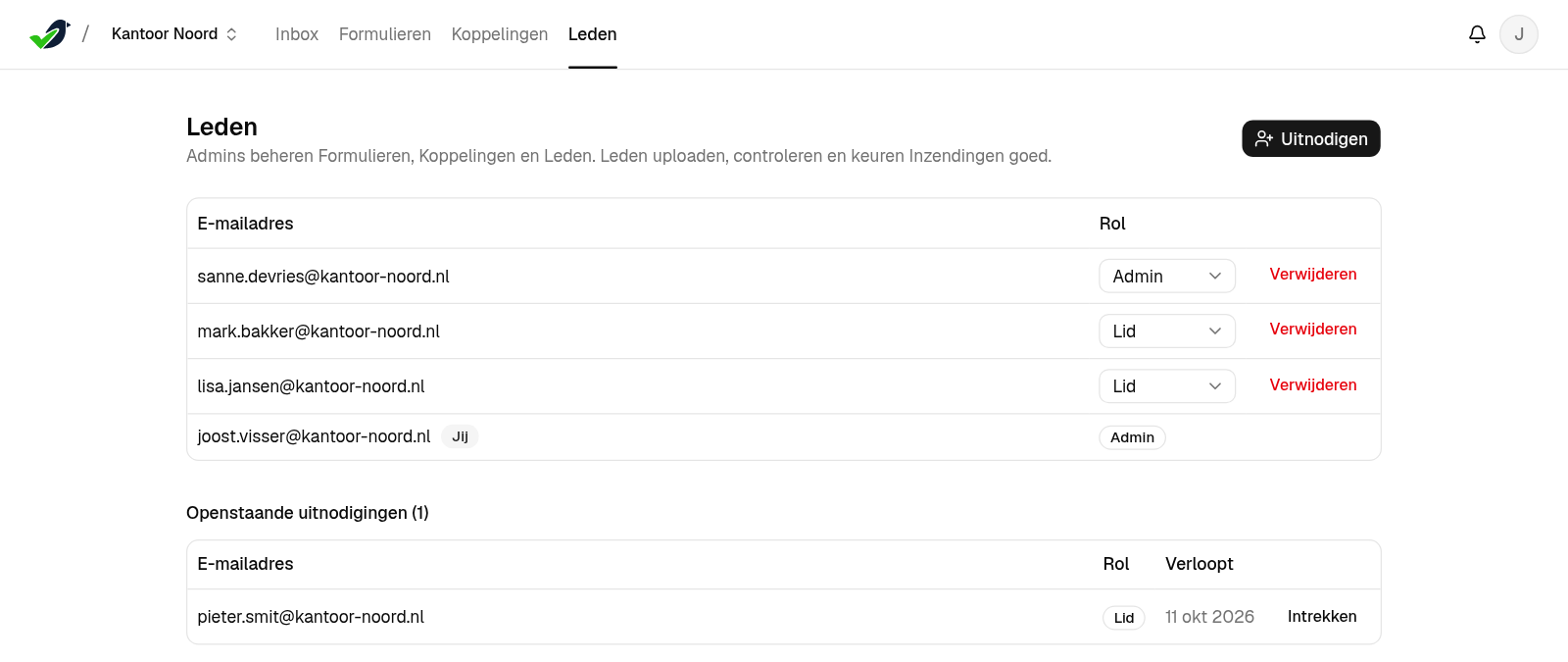
The Members page with four people and a pending invitation.

Every plan includes everything.

You only choose how many credits. A PDF page, an email or a photo costs 10 credits. Start with 200 free credits, no credit card.

See pricing →
  • Unlimited users
  • All Forms and Fields
  • Review and Approval
  • Integrations
  • Keeping data in Vink

Stop retyping. Start with 200 free credits.

No credit card. Already a customer? Log in

Start free